INVENTORY CONTROL PROFESSIONAL (PRO)
Inventory Control Pro includes all the functionality of the Standard (Std) edition and extends the functionality with the following features:
- 5 PC Users (network capability)
- Kitting
- Assembly and disassembly
- Purchase orders (create, then print or e-mail)
- Full receiving functionality
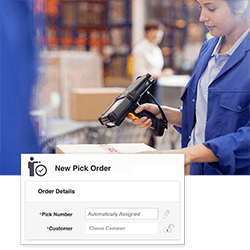
- Order picking and tracking
- Multiple suppliers per item
- Unit breakdowns (during receiving)
- Supports non-inventory items (supplies)
Click here to view all of the features available in Inventory Control Standard, Pro and Enterprise editions. 
Get in control of your inventory with Wasp Inventory Control – the complete inventory tracking solution for small businesses. Increase the value of your business, satisfy your customers and create more freedom in your life with Inventory Control.
Wasp Inventory Control will help you eliminate common inventory problems including:
- Costly end of year inventory write-offs
- Inaccurate inventory counts resulting in customer dissatisfaction and loss of sales
- Wasted time spent searching for missing inventory
Engineered to improve efficiency and profitability, Wasp Inventory Control provides the capabilities you need to accurately track inventory, without the complexity or expense of an enterprise solution. Easy. Efficient. Affordable.
Ideal for businesses ranging from individual contractors to larger operations with multiple locations, Inventory Control delivers advanced capabilities in an easy-to-use format. Inventory Control is recommended for:
- Warehouses
- Light manufacturing and distribution centers
- Retailers
- Stock rooms & supply closets
- Inventory-carrying mobile trucks, ships or containers
- Installation contractors or any business that buys, stocks and sells parts and products
Inventory Control allows you to define multiple sites (a warehouse, truck fleet, stock room, or even a installation truck such as a TV or satellite installer) with multiple locations (a bin, shelf, or even a pallet within the location). It’s simple to track your inventory by location, serial number, lot or any combination of the numerous ‘track bys’.
Easily create barcode labels with Wasp Inventory Control. Print barcode labels or inventory tags using data from the Inventory Control database. Attach barcoded labels to inventory items, physical locations or pallets to quickly improve efficiency.
This ready-to-use inventory tracking solution includes:
- Inventory Control software Pro version
- 5 PC User licenses
- 1 Mobile device license (mobile device available separately)
- Integrated full version of WaspLabeler (barcode labeling software)
- Free, unlimited technical support for the life of the product
System Requirements
- Windows 2000, XP (SP2), Vista (32-bit), Server 2003 (32-bit), Server 2008 (32-bit)
- Pentium 4 (500 MHz) or better processor
- 512Mb RAM minimum (1Gb recommended)
- 1Gb of available hard drive
- CD-ROM Drive (for software installation)
Mobile Device Requirements
Windows Mobile or Windows CE (Palm OS is not supported)
- Windows® Mobile Requirements
- Windows Mobile 2003 or later
- 64MB of RAM
- Windows® CE Requirements
- Windows CE 4.2 or higher
- 64MB of RAM
Benefits
- Maintain current inventory counts
- Increase sales due to improved responsiveness to customers and distributors
- Reduced write-downs/write-offs
- Reduce stock outs and overstocks
- Reduce labor costs
- Know where all inventory is located, onsite or offsite
- Track the cost of your inventory
Features
Inventory Control Pro includes all the functionality of the Standard (Std) edition and offers the following additional capabilites:
(
the list of Std features)
5 PC Users (network capability)
- Includes Microsoft SQL Express database with 1 server license and 5 client licenses
- Install on 1 database server with 5 PC clients on network or
- Install on 1 server/PC client with 4 PC clients on network
Kitting
- Create kits containing multiple finished goods for improved efficiency in sales transactions
Assembly / Disassembly
- Group components and raw materials to create a finished good for inventory
- Track inventory level of assembly items
Purchase Orders
- Create POs using system stored supplier info and part numbers
- Select quantity and price with automatic total calculations
- Print or email PO
Full Receiving Functionality
- Receive against PO on PC (or mobile device)
- Create backorders or leave open for future receiving on short orders
Order Picking and Tracking
- Create pick slips complete with barcodes
- Scan or use mobile device
Multiple Suppliers Per Item
Unit Breakdowns (during receiving)
- Simple unit breakdowns when receiving to your stand UoM (Unit of Measure)
Wasp Inventory Control Handheld Features
- Add and remove inventory in seconds
- Move inventory from one location to another
- Scan data into Wasp Inventory Control for fast, error-free input using a Wasp mobile device, Pocket PC device, Windows CE or Windows Mobile device. (NOTE: Hardware NOT INCLUDED with the software only package)
- Search inventory by item number, alternative item number, or description
- Use the quick find function to locate inventory - simply input the first few numbers or letters of your item and find it in seconds
- Use the audit feature to easily perform periodic inventory counts
Inventory Control - Inventory Software Trial Version
Ensure that Inventory Control is the right solution for your organization with a free software trial. Select from trial methods including instant online product trial, 30-day trial CD, and 30-day trial download.


Inventory Control – Inventory Software Product Brochure
Inventory Control – User Guide
Case Study – Process Control Outlet

Get the latest patches and updates

INVENTORYCONTROL TUTORIALS MAKE
GETTING STARTED Easy and Painless!
Get started using your Wasp product quickly and easily with the following video tutorial. This tutorial is divided into chapters, designed to let you select the topics you need assistance on.
- Installing InventoryControl
- Creating Items & Adding Inventory
- Customizing Track By Field
- Removing Inventory
|
- Moving Inventory
- Auditing Inventory
- Creating Assembly Items
- Assembling &
Disassembling Assembly Items
|