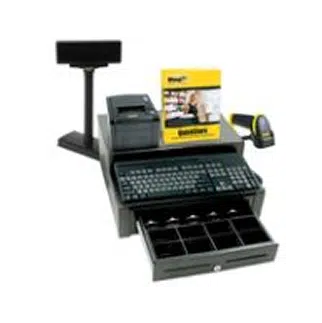

Point of Sale (POS) Software & Systems

Point of Sale
live demo

RETAIL Point of Sale Software & SYSTEMS (POS)

Wasp Barcode Technologies’ Point of Sale (POS) solutions allow independent retailers to run faster and more efficiently, while providing customers with the service they demand. Lower costs of operation, improved sales and higher customer satisfaction will help make your business a success.


Choose from QuickStore RapidStart, Pro or Multi-Store solutions. QuickStore Point of Sale™ solutions include integrated POS hardware and software – just add a PC and monitor for a complete POS workstation. Wasp point of sale hardware is also available for purchase separately – supplement your existing solution with a barcode scanner, POS cash drawer, POS receipt printer, pole display, and more.


Retail Point of Sale (POS) Software


Point of Sale RapidStart Bundle

QuickStore RapidStart

Point of Sale Solution

- Ideal for a 1-store operation

   with moderate traffic

- Includes QuickStore Standard

   software and RapidStart

   POS hardware kit


Point of Sale Professional Bundle

QuickStore Pro
Point of Sale Solution

- Ideal for a 1-store operation
   with single or multiple lane
   checkouts. Can handle
   higher traffic

- Includes QuickStore Pro

   software and complete POS    hardware kit


Point of Sale Multi-Store Bundle

QuickStore Multi-Store

Point of Sale Solution

- Ideal for a multi-store
   operation with single or
   multiple lane checkouts. Can
   handle high traffic levels

- Includes QuickStore Enterprise

   software and complete POS    hardware kit


Point of Sale Hardware Bundle

Complete Point of Sale
Hardware Kit

- Ideal hardware solution if
   you currently own a POS
   software package


QuickStore Software

Point of Sale
Software

- Rapidly check customers out
- Manage your inventory
- Track item and customer

   sales history
- Access detailed reports


Point of Sale 
Cash Drawer

Point of Sale
Cash Drawer

- All-metal construction
- Compact design
- Easy installation
- Media slots


Point of Sale
Receipt Printer

Point of Sale
Receipt Printer

- Fast receipt printing
- High print quality
- Receipt printer designed for

   POS solutions
- USB or Parallel


Point of Sale 
Keyboard

Point of Sale
Keyboard

- Keyboard designed for

   POS solutions
- Built-in mag. stripe reader
- Spill resistant
- Programmable keys


Point of Sale Barcode Scanners

Point of Sale
Barcode Scanner

- Improve checkout efficiency

   by quickly scanning

   barcoded labels

- Quick and easy installation

   through USB port –

   no drivers necessary


Point of Sale Barcode Printers

Point of Sale
Barcode Printers

- Create barcode labels

   for inventory items,

   shelves and storage

- Easy to install and use


Point of Sale Pole Display

Point of Sale
Pole Display

- Checkout display for

   POS solutions
- Large, easy-to-read display


Point of Sale Pole Display

Point of Sale
Magnetic Stripe Reader

- Reads magstripes on credit    cards or badges
- Ideal for reading credit cards    for POS payment


Learn More

download brochure | Point of Sale case studies | Version comparision chart | Screen shots


Integrating the necessary point-of-sale hardware can seem daunting without an understanding of how the components work together. A typical point-of-sale hardware system is comprised of several components, as shown below:


The hardware components in your POS solution provide the following functionality:


Barcode scanners transfer product information to the POS system.

Receipt printers generate receipts as transaction records.

Cash drawers provide storage, security and organization for cash, coins, checks, and credit slips.

Pole displays show transaction information to the customer, as provided by your POS software.

Magnetic stripe readers read the information encoded on electromagnetic strips located on the back of credit, debit, and gift cards and provide banking information so transactions can be completed. The magnetic stripe reader may be integrated into the POS keyboard or monitor to maximize space at your POS workstation.  


In addition to the specialized point of sale hardware listed above, a point of sale solution also requires a personal computer and a monitor. The monitor will display necessary transactional information to the employee. The POS software you select will integrate the hardware components to create a POS solution designed to maximize profits and efficiency.


POS Product Brochures

Quickstore software only brochureQuickstore Point of Sale Software
Wasp QuickStore POS software allows you to manage your retail business easily and efficiently, from completing POS transactions to tracking inventory and customer data.


Quickstore Standard and Professional bundlesComplete QuickStore Solutions
Choose from RapidStart, Pro and Multi-Store versions featuring integrated POS hardware and software.


Quickstore hardware brochureWasp Point of Sale Hardware
Supplement your POS solution with additional hardware from Wasp.


Point of Sale Case Studies

Case Study - The Sunglasses ShopThe Sunglasses Shop specializes in designer sunglasses, watches and accessories, offering luxury brands including Gucci, Maui Jim, and Ray-Ban. The online and store retailer started out with two employees, and rapidly expanded to a staff of fifteen to accommodate a growing customer base.


Case Study - LPGAWasp QuickStore™ Point of Sale Scores a Hole-in-One at the LPGA For over 27 years, The Wegmans Rochester LPGA has been one of the most popular stops on the LPGA tour. It combines the world's best golfers, the most enthusiastic crowds and many eager volunteers that join to raise funds for special causes.


Case Study - Harold's Fine Home LightingWasp QuickStore™ Point-of-Sale lights the way to a Brighter Future Harold’s Fine Home Lighting is a company based on tradition. Harvey Hanson started the business during the depression when he used his artistic skills to create lamps and then sell them door-to-door.


Case Study - North American CellularNorth American Cellular is one the largest retailers of cellular phones in Connecticut. They offer a large variety of phones, phone accessories, communication equipment, and service plans. When the company’s owner, Art Robles, began this business four years ago, he never imagined the company would grow so rapidly.


Case Study - Nicky NicoleNicky Nicole, a new children’s clothing store located in Hudson, Ohio needs a point of sale and retail management system that can keep up with such a fashion forward business. The owner, MJ Lehman, wants a data based point of sale system that provides accurate inventory control, sales tracking, and professional customer transactions.


Know Your QuickStore

QuickStore version comparison chartView the QuickStore software version comparison chart

Choose the Wasp Point of Sale software version that best fits your business.


QuickStore screen shotsView QuickStore screen shots

Wasp QuickStore Point of Sale software is the easiest, quickest way to checkout customers and manage inventory.

QuickStore - Point of Sale Software


Download a fully functional version of Wasp QuickStore for 30 days. 

To download the program, fill out the online form and follow the online instructions. An email with a trial software installation key (this number key is required to use this trial version) will be sent to you immediately after filling out the online form and clicking submit. If you don’t see this email in your inbox, please check your SPAM folder.


Should you decide to purchase the product, call sales at 214-547-4100 to purchase an activation key.

Note: The Trial Version program comes with an UnInstaller to completely remove the program from your system at a later date if necessary.


QuickStore Bundle product brochure


View the QuickStore version comparison chart

Point of Sale Support Center


The Support Center provides helpful information on products and services.

  • Technical support (learn how to place a tech support call or support ticket)
  • Knowledge base (frequently asked questions)
  • Product registrations
  • Shipping & payment options
  • Warranty & return policies


live demo

testdrive

testdrive

Case Studies

Support Center
Support Center

Here’s the center for all your Wasp support needs and questions. Access to technical support, downloads, and knowledge base; information on returns, shipping & payment options, product registration and warranty policy.


Ask Us A Question
Wasp Live Chat

Need just a little more product information? Or help finding what you are looking for? Send an email to a knowledgeable Wasp representative and receive an email response.


Wasp Catalog
WaspCatalog™

Not sure what product solution you need?  Or just doing some initial information gathering?  Get the FREE Wasp Catalog – it’s a terrific source of information that will help guide you to your final solution.


Wasp SBIC
WaspSBIC™

The Wasp Small Business Information Center (SBIC) is the resource center for small businesses.  Here, you will find almost 100 valuable links that will help you successfully start and profitably grow your small business.