 USD
USD GBP
GBP EUR
EUR
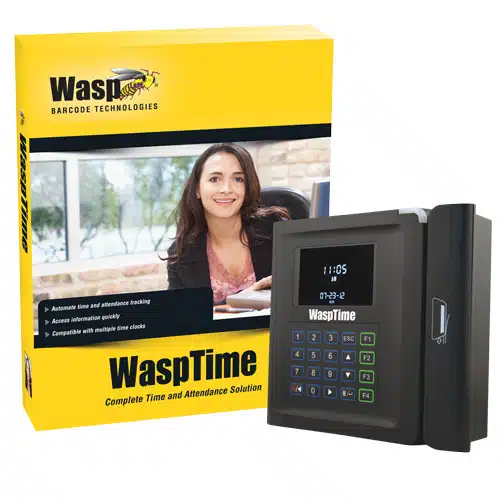
WaspTime v7 Standard with Barcode Time Clock (UK ONLY)
 Spec Sheet
WaspTime time and attendance software allows your organization to:
Track employee time, including arrival and departure time, lunch, breaks, overtime, holidays, and absences
Establish rules governing how employee time is accounted for (rounding, early clock in or out, overtime)
Reduce inconsistencies and errors associated with manual time tracking
Increase time card accuracy
Minimize payroll processing time
Generate more than 30 professional management reports
- WaspTime software with barcode time clock
- Most cost effective time keeping option
- 50 barcode badges
- Reduce costly payroll errors from inaccurate time cards and manually calculated employee hours
- Eliminate inflated labor hours and buddy punching with WaspTime Biometric solution
- Network (Ethernet) connectivity for quick and easy implementation without the cost of a dedicated PC
- Generate reports that provide accurate, timely information
- Significantly reduce time required to process employee time and attendance data
WaspTime time and attendance software allows your organization to:
- Track employee time, including arrival and departure time, lunch, breaks, overtime, holidays, and absences
- Establish rules governing how employee time is accounted for (rounding, early clock in or out, overtime)
- Reduce inconsistencies and errors associated with manual time tracking
- Increase time card accuracy
- Minimize payroll processing time
- Generate more than 30 professional management reports
- PC System Requirements
- 32-bit or 64-bit version of:
- Windows 8
- Windows 7
- Windows Vista
- Windows XP (SP3)
- Windows 2000
- Windows Server 2012
- Windows Server 2008
- Windows Server 2003
- Pentium 4 (800 MHz) or better processor
- 512 MB RAM minimum (1 GB recommended)
- 2 GB of available hard drive (10 GB recommended)
- 1024 x 768 resolution and 16-bit high color or better
- CD-ROM Drive for software installation
- WaspTime Web Server System Requirements
(Works with WaspTime Pro and Enterprise) - 32-bit or 64-bit version of:
- Windows Server 2012
- Windows Server 2008
- Windows Server 2003
- Internet connection speed 720 kbps or better
- Pentium 4 (2GHz) or better processor
- 4 GB of RAM of free memory
- 2 GB of available hard drive
- CD-ROM drive (installation only)
- IIS 6.0 or later
- Installation/Support considerations:
- The Wasp installer will install the WaspTime Web module to the default website that is a local host inside your network. This website should be available to anyone that is part of your local network. Wasp technical support is available to help get local web setup completed.
- If you want to make changes to the network setup of WaspTime Web, including making it available outside your local network, you will require the services of a web / IT professional that is beyond Wasp’s support.
 Request Tech Support
 Register a Deal
WaspTime Time and Attendance Software
WaspTime is a time and attendance system designed to automate employee time tracking and give control over lost time and productivity. Featuring an intuitive, easy-to-use interface, WaspTime dramatically reduces the number of hours required to process employee time records and subsequently, payroll. According to a study by the APA (American Payroll Association), companies today can save up to 4% of annual payroll expenses simply by adopting an automated time and attendance system.
WaspTime is ideal for a wide range of industries where hourly and salaried employee time is tracked, including manufacturing, warehouse & distribution, healthcare, retail, professional and medical offices, government, and educational agencies. It is scalable to grow with your business and offered in Standard, Professional, or Enterprise editions to meet your time tracking needs.
Combined with a time clock solution from Wasp, this software will give you everything you need to track all of the important aspects of your employee time, from when they arrive to when they leave for the day.
Each Wasp time clock is designed to work with WaspTime time and attendance software. Wasp offers a full line of time clock solutions designed to work for businesses of every size.
All WaspTime Software Includes:
- Lifetime Technical Support
- 50 Employee Licenses
- 1 Manager (Admin) License
- 1 Concurrent log-in
- 34 Management and Payroll Reports
- Tardy/Absence Tracking
- Automatic Data Backup
- Syncs Payroll with QuickBooks
- Auto-detection of new or additional clocks
- Supports Unlimited Departments
- Supports Ethernet/RJ-45 and POE
- Attaches photos to employee records
- Applies DST to Time Cards
- Includes MS SQL Express Database
- Restricts Sensitive Data
 BUY
BUYWaspTime v7 Standard with Barcode Time Clock (UK ONLY)

This item is no longer available.

Accessories & Frequently Purchased With