Build the Right Tracking System for Your Operation
Know what ingredients, supplies, and equipment you have, where they’re located, and what’s ready for service across locations.
Full Inventory and Asset Visibility
Wasp tracking software gives hospitality teams one system to manage food inventory, kitchen equipment, and operational supplies with clear locations, usage history, and accurate records.
Wasp Inventory helps restaurants track ingredients, beverages, packaging, and kitchen supplies in one organized system. Replace spreadsheets with accurate stock counts, storage locations, and usage history.
Stock Level Controls Set minimum and maximum quantities so restaurants and hospitality teams know when ingredients or supplies are running low and replenishment can be planned ahead of time.
Automatic Alerts Receive notifications when inventory falls below thresholds, items approach expiration, or other conditions require attention.
Purchase and Pick Orders Create purchase orders for incoming ingredients and supplies and manage distribution across locations.
Inventory Reporting Generate reports on ingredient usage, supply levels, and purchasing activity to help control food costs and manage operations.
Wasp Asset helps hospitality teams track kitchen equipment, POS systems, tablets, refrigeration units, and other operational assets. Maintain centralized records with assignments, maintenance history, and lifecycle tracking.
Asset Audits Verify equipment quickly using barcode scanning and audit tools that keep asset records accurate across locations.
Check-In / Check-Out TrackingAssign tablets, handheld devices, and operational equipment to employees or locations while maintaining a full history of assignments.
User Permissions Control who can view, edit, and manage asset records to maintain accountability across hospitality teams.
Customizable Asset RecordsConfigure up to 150 fields so asset records match your equipment types, locations, and reporting requirements.
Recommended Barcode Scanners for Hospitality
Reliable scanners for tracking food inventory, labeling supplies, and managing equipment across locations.
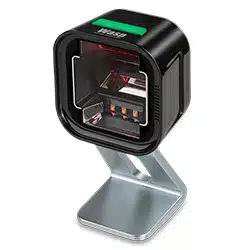
Wasp WPS1500 Omni-Directional Barcode Scanner
The Wasp WPS1500 quickly scans barcodes from labels or screens in hands-free or handheld mode, making it ideal for scanning packaged ingredients, supplies, or inventory at prep stations and storage areas.
The Wasp WWS652 delivers fast, wireless scanning for tracking inventory and equipment throughout the restaurant. Its cordless design makes it easy for staff to scan items in kitchens, storage rooms, or receiving areas.
Print clear, durable labels for food inventory, storage areas, equipment, and operational supplies.
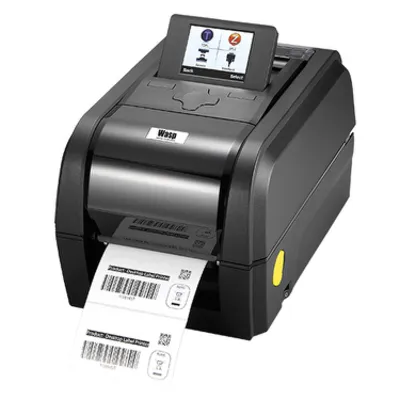
Wasp WPL206 Barcode Printer
The Wasp WPL206 prints clear barcode labels for ingredient containers, storage bins, and hospitality inventory, helping staff maintain organized kitchens and accurate stock counts.
Our solution sales team helps hospitality organizations choose, configure, and launch the right tracking system for food inventory, equipment, and operational supplies.
Product Selection
Identify the right software, barcode scanners, and printers to support your operations.
Custom Configuration
Wasp software, scanners, and printers can be configured to match your restaurant locations, kitchens, storage areas, and processes.
Setup & Training
Receive setup and training support for a smooth implementation.
Texas Christian University’s Sports Nutrition Department manages food inventory across multiple fueling stations that supply athletes with snacks, recovery smoothies, and other nutrition products. With more than 300 items from over 40 vendors, the team relied on manual checks to see what was running low and track expiration dates, making the process slow and inconsistent. They implemented Wasp Inventory to create a centralized system for tracking food products, stock levels, and expiration dates across their storage locations. Using barcode scanning and a mobile app on iPads, staff and student volunteers can quickly record inventory and keep records up to date. The department now maintains better visibility into food inventory, reduces waste, and keeps fueling stations stocked so athletes always have the nutrition resources they need.