



Asset tracking software that gives you visibility
Wasp Asset delivers full life-cycle asset management, streamlined auditing and loss prevention
Ditch the Spreadsheet, Put Down the Pen and Paper
Automate Check-In/Check-Out and Expedite Audits
Track where your fixed assets are, who has your assets, and when your assets are due back. Checking out assets allows you to assign responsibility to an employee, a customer, or even a vendor. Checking in assets releases end user responsibility and allows the assets to be reallocated throughout your organization.
Expand Wasp Asset with Customizable Options for Your Asset Management Needs
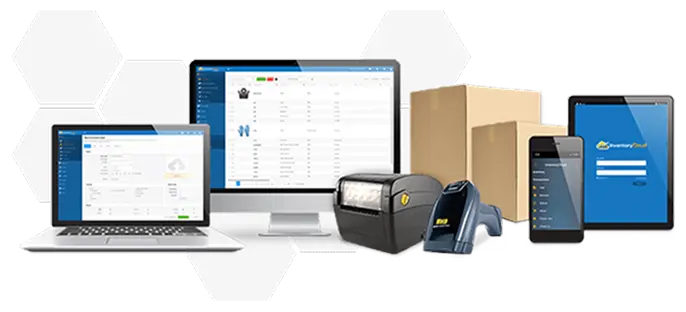
Explore Wasp Asset - Cloud Complete + RFID. Pair your Wasp Asset - Cloud RFID annual subscription with a compatible RFID mobile computer and durable RFID asset tags to easily perform bulk asset transactions such as moves, check - outs / check - ins, and disposals. Complete solution. One provider. Simplify your asset management with one vendor for your barcode scanners, barcode and RFID asset tags, asset management software, and more.
Asset Software Features
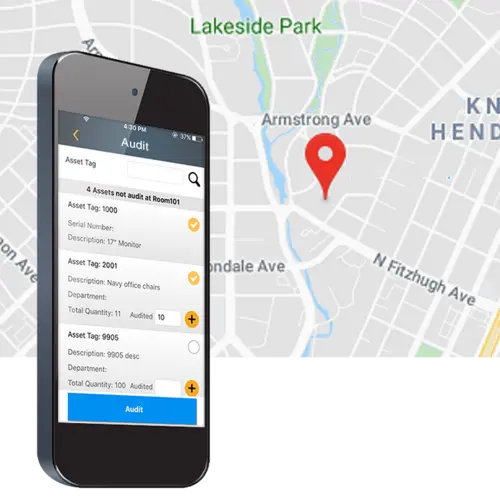
Perform Audits to Verify and Eliminate Inconsistencies
Tracking where fixed assets are, who is in possession of the assets, and when assets are due back. Checking out assets assigns responsibility to an employee, a customer or even a vendor. Checking in assets releases end-user responsibility and allows the assets to be reallocated.
Create Reports for Accountability and Insight
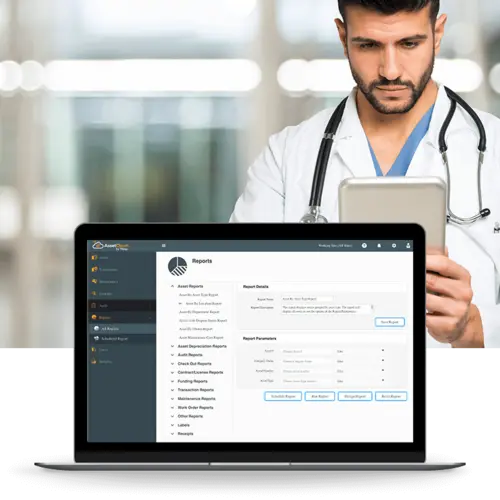
Wasp Asset’s reporting suite includes 25 common, pre-built reports that help manage assets out-of-the-box and collect data-driven feedback. Users also have the ability to design custom reports designed specifically to their business and tracking needs.
Trigger Notifications for Critical Intelligence
Receiving instant feedback on asset-related events within your organization allows everyone to be better informed. Wasp Asset’s notification engine allows you to set custom triggers to save time and empower people with information.
Manage Maintenance and Work Orders
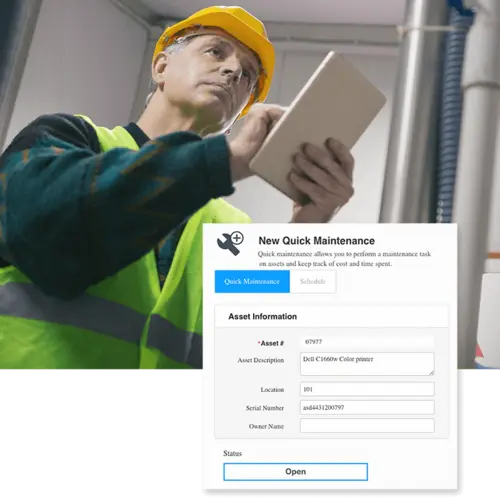
Quick maintenance allows end-users to assign maintenance tasks to individual assets, which could be anything from heavy machinery to fleet vehicles to fire extinguishers. Work orders can be created that are assigned to one or multiple people, can contain one or multiple assets and require the completion of one or multiple tasks.
Examples of Use
IT Asset Tracking
Provides insight into the full life-cycle management of IT assets and empowers you to make strategic decisions for your organization...
Facility Management
Individually managing large quantities of non-critical, but similar assets for compliance checks is time consuming and grueling...
Funding Management
Maintaining compliance on funds issued to your organization is crucial. Wasp Asset allows you to manage the awarded funds and the...
Equipment Tracking
The cost of lost and unused equipment can add up quickly. Wasp Asset allows tracking of all your important equipment and makes it easy and...
Tool Tracking
Increase efficiency and standardize procedures for tool access and eliminate issues related to tool management and control...
Mandate Compliance
Most state and federal laws mandate that fixed assets be controlled and accounted for throughout their useful life...
Wasp Asset Reviews
Matt M
Product: Wasp AssetCloud
Track your assets at all times. Enjoy the product and I am in an environment that has not had any inventory other than some spreadsheets. I can now check out things to end users and check them in when IT is working on them. I ALWAYS know where an asset is and who has it.
Capterra
Petrica S
Product: Wasp AssetCloud
An excellent IT Equipment Asset Cloud management tool! I have been working with Wasp products for the past decade, starting from the on-premises solutions. Transitioning to the cloud has made it incredibly easy to manage and track all our company's IT assets. Our company uses AssetCloud daily, and the improvements made to the platform are impressive. Keep up the excellent work.
Capterra
Travis V
Product: Wasp AssetCloud
Wasp AssetCloud makes my job 1000% easier! AssetCloud has been wonderful with my asset tracking on all in office and out of office devices especially while having multiple sites.
Capterra
Organizations Trust Wasp for Tracking Solutions
Common questions about asset tracking software
What is asset tracking software?
Asset tracking software is a centralized system for tracking the assets your business owns and uses, including laptops, tools, vehicles, equipment, and IT hardware. It helps you know where assets are, who has them, their condition, and their status throughout their lifecycle. Most asset tracking systems use barcode asset tags, RFID tags, or GPS tracking to record asset activity. Each scan or update creates an up-to-date record of check-outs, transfers, audits, maintenance, and other asset changes.
What's the difference between Wasp Asset and AssetCloud?
Wasp Asset and AssetCloud are the same asset tracking software. AssetCloud was the original product name. Wasp Asset is the current name. Today, Wasp Asset is available in two deployment options: Wasp Asset – Cloud and Wasp Asset – On-Premise, allowing businesses to choose the setup that best fits their requirements.
What kinds of assets can I track with asset tracking software?
Asset tracking software can track almost any physical asset your organization uses, maintains, or assigns to employees and departments. Common examples include IT assets like laptops, monitors, tablets, servers, and mobile devices; equipment like tools, machinery, lab instruments, and medical devices; vehicles and fleet assets; facility assets like furniture, fixtures, and HVAC equipment; field service tools and gear; and funded assets that require audit trails and traceability. The unifying trait is that each individual asset matters, not just the quantity. Asset tracking software helps organizations track where assets are, who has them, their condition, maintenance history, and lifecycle status over time.
How does check-in and check-out work in asset tracking software?
When an asset is assigned to an employee, customer, student, or vendor, you check it out by scanning the asset barcode or RFID tag. The software records who has the asset, when it was checked out, and when it’s due back. When the asset is returned, you check it back in with another scan, making it available for the next user. The same process also supports audits, maintenance routing, and loss prevention. Most check-in/check-out actions take seconds with barcode or RFID scanning, replacing the manual updates and spreadsheet tracking many organizations outgrow.
What equipment do I need to start tracking assets?
For most businesses, getting started with asset tracking requires three things: asset tracking software, asset tags or barcode labels, and a device for scanning assets. That device might be a smartphone, barcode scanner, rugged mobile computer, RFID reader, or GPS tracker depending on the environment and tracking requirements. Offices and schools often start with barcode labels and mobile devices for asset check-in and check-out. Warehouses, manufacturing facilities, healthcare organizations, and field teams may use rugged mobile computers, long-range scanners, RFID equipment, or GPS tracking for faster scanning and real-time visibility. Wasp provides the software, scanners, mobile computers, barcode labels, RFID equipment, and support from one vendor, so when issues come up, you work with one U.S.-based team instead of multiple vendors.
What's the difference between barcode and RFID asset tracking?
Barcode asset tracking requires a scanner or mobile device to see and scan each asset label individually. It’s simple, accurate, cost-effective, and the right fit for most organizations. Barcode tracking works well for asset check-in and check-out, audits, maintenance records, and day-to-day asset management. RFID asset tracking uses radio waves instead of visible barcode scans. RFID readers can identify multiple tagged assets at once without direct line of sight, making audits and bulk asset updates much faster. RFID is often used for high-value equipment, shared assets, warehouses, healthcare environments, and organizations managing large asset populations. Most organizations start with barcode tracking because it’s easier and less expensive to implement. RFID is typically added when scanning speed, automation, or large-scale visibility become more important. Wasp supports both barcode and RFID asset tracking, including RFID mobile computers and durable RFID asset tags designed for faster audits, check-ins, check-outs, moves, and large-scale asset updates.
How does asset tracking software help with audits?
Audits are the high-pain moment for asset records. With spreadsheets, audits usually mean walking room to room, checking assets manually, and reconciling differences by hand. With asset tracking software, an audit becomes a scan: walk the location, scan assets, and the software compares what’s there against what the records show should be there. Missing assets and discrepancies surface immediately. For organizations with grant funding, fixed-asset reporting requirements, or compliance standards common in government, education, healthcare, and defense, asset tracking software also creates a documented audit trail of asset activity, assignments, maintenance, and disposals. That makes audits faster, more accurate, and easier to complete without the manual reconciliation work.
Should I choose cloud or on-premise asset tracking software?
Wasp Asset is available in cloud (Wasp Asset – Cloud) or on-premise (Wasp Asset – On-Premise) deployments. Cloud is the default for most customers: easier setup, automatic updates, mobile access from any internet-connected device, and U.S. data residency. On-premise is the right call for IT teams running behind their own firewall, organizations with strict network segmentation or air-gapped environments, and sectors with compliance mandates that rule out SaaS, including government, defense, healthcare under specific regulations, and some manufacturing environments. Wasp offers both with a documented migration path between them, so the choice today doesn’t lock you out of changing later.
How long does it take to set up asset tracking software?
Setup time depends on how many assets need to be imported, how organized your existing records are, and how many locations, departments, or users you’re managing. Many organizations can begin tracking assets within a week, especially if they have accurate asset data ready to import or a straightforward check-in and check-out process with a few hundred assets to track. More complex setups involving multiple locations, RFID or GPS tracking, or integrations with existing systems may take longer. Wasp provides the software, scanners, mobile computers, barcode labels, RFID equipment, GPS tracking, and support together, which helps simplify setup and reduce compatibility issues between systems and hardware.
How does asset tracking software compare to managing assets in a spreadsheet?
Spreadsheets can work for tracking a small number of assets, but the breakdown usually happens at the same predictable points: when assets change hands and records don’t get updated, when audit time comes and teams have to manually verify hundreds of assets, or when something goes missing and there’s no reliable history showing where it went. Asset tracking software solves those problems with barcode, RFID, or GPS-based tracking, scanned check-in and check-out, automated audit verification, and a complete transaction history for every asset. Most organizations move beyond spreadsheets once asset counts grow, multiple people need access to the data, or audits and reporting become difficult to manage manually.
Let Us Show You How It Works
Request a free Wasp tracking solution consultation.