- TAG IT
- SCAN IT
- TRACK IT
Blog Article
A no-frills comparison for small businesses, offices, and light retail environments that need a reliable barcode scanner without the enterprise price tag. If you’re a small business owner, office manager, or retail associate looking for a reliable, budget-friendly barcode scanner then this comparison is for you.
These three scanners don’t all use the same technology which is a meaningful distinction at this price point.
Wasp WCS3950: 1D CCD linear imager. No moving parts. CCD scanners capture the entire barcode at once using an array of LEDs and a sensor. Mechanically simpler and durable for close-range scanning. Reads up to 12 inches. Minimum resolution: 4 mil.
Zebra LS1203: 1D laser scanner. Standard, proven laser sweep technology. Reads up to 10 inches which is the shortest range in this group. Minimum resolution: 4 mil.
Honeywell Voyager 1200g: High-performance 1D laser scanner. Reads up to 18 inches which is nearly double the LS1203’s range. Minimum resolution: 3.5 mil, the finest in this group. Strong on damaged barcodes.
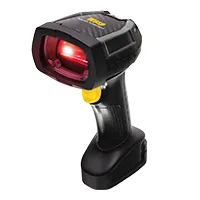 Wasp WCS3950
|
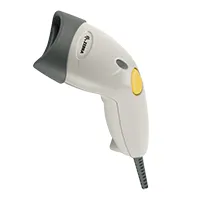 Zebra LS1203
|
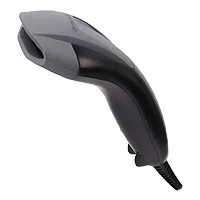 Honeywell Voyager 1200g
| |
|---|---|---|---|
| Scan Type | 1D CCD (Linear Imager) | 1D Laser | 1D Laser |
| Scan Pattern | Linear Imager | Single Line | Single Line |
| Read Range | Up to 12 in (30 cm) | Up to 10 in (25 cm) | Up to 18 in (45 cm) |
| Min Resolution | 4 mil | 4 mil | 3.5 mil |
| Interfaces | USB | USB, RS232, KBW | USB, RS232, KBW |
| Drop Rating | 5 ft to concrete | 5 ft to concrete | 5 ft to concrete |
| Warranty | 2-year | 3-year | 5-year |
| Damaged Barcode Reading | Standard | Standard | Superior |
| Software Integration | Wasp Asset / Wasp Inventory | Zebra 123Scan | Honeywell EZConfig |
Verdict: The Honeywell Voyager 1200g leads on every key scanning spec. The WCS3950’s CCD advantage is durability and close-range precision. The LS1203 suits multi-interface legacy POS environments.
The Voyager 1200g’s 5-year standard warranty is the longest in this category and a genuine total-cost-of-ownership advantage. The LS1203 carries 3 years. The WCS3950 covers 2 years but can be extended through WaspProtect service plans including accidental breakage coverage.
The Wasp WCS3950 connects directly to Wasp Inventory and Wasp Asset. For small businesses already using Wasp software, pairing the WCS3950 means one vendor for the scanner, the software, the labels, and the support.
Wasp WCS3950
Best for: Small businesses using Wasp software and close-range desktop scanning
Simple USB setup, native Wasp software connection, and CCD reliability at a desk or counter. For light retail, office inventory, and basic asset management, it does the job with one vendor covering everything.
Honeywell Voyager 1200g
Best for: Maximum capability in the entry tier
RS232 and keyboard wedge support for older POS hardware, backed by Zebra’s software ecosystem. The right choice for Zebra-managed environments and legacy system compatibility.
Zebra LI2208
Best for: Existing Zebra POS environments and enterprise procurement
Best read range, finest minimum resolution, best damaged-barcode performance, longest warranty. For healthcare environments, receiving operations, or anywhere label quality varies, the Voyager 1200g is the most capable entry-tier scanner in this comparison on every objective measure.
The Honeywell Voyager 1200g wins on spec-for-spec performance at this tier. The LS1203 fits Zebra ecosystems. The WCS3950 is the natural choice for small businesses running Wasp software who want one vendor relationship for everything.
Interested in the WCS3950? Request a Quote »
A laser scanner uses a moving beam to sweep across a barcode, effective across varied distances. A CCD scanner uses a fixed LED array with no moving parts. It is mechanically simpler, reliable for close-range scanning, and generally more durable. The WCS3950’s CCD design means no motor to wear out. Laser scanners like the LS1203 and Voyager 1200g tend to outperform CCD at longer distances.
Minimum resolution (in mil) is the narrowest bar width the scanner can reliably read. At 3.5 mil, the Voyager 1200g reads more densely printed barcodes than the 4-mil scanners which is relevant for small product packaging, healthcare labels, or environments where barcodes are printed at reduced sizes.
Yes. The WCS3950 is designed to connect directly with Wasp Asset and Wasp Inventory. The LS1203 and Voyager 1200g also work with Wasp software via keyboard input, though support is handled by separate vendors.
It’s worth factoring into total cost of ownership. A 5-year warranty on the Voyager 1200g vs. 2 years on the WCS3950 means potentially no replacement cost for 5 years at a price point where the scanners are relatively affordable. For high-volume environments with faster wear rates, the longer warranty provides more value.
The Honeywell Voyager 1200g. Its superior damaged-barcode reading handles varied label quality common in food retail, 18-inch range gives checkout staff flexibility, and the 5-year warranty holds up to high scan volumes in grocery environments.
No. All three are plug-and-play USB devices that send barcode data as keyboard input. No drivers needed on modern Windows, macOS, or Linux. Configuration utilities are available but not required for standard scanning.
Specifications sourced from Wasp Barcode Technologies, Zebra Technologies, and Honeywell product documentation. All product names are trademarks of their respective owners. waspbarcode.com | 1-866-547-9277