- TAG IT
- SCAN IT
- TRACK IT
Blog Article
A focused comparison for mobile workers, field teams, and operations staff who need a scanner that goes where they go and pairs directly with a phone or tablet. If you’re a field technician, retail associate, warehouse auditor, or operations manager looking for a compact wireless scanner that pairs with a smartphone or tablet then this comparison is for you.
A pocket scanner is the right tool when staff need to scan barcodes away from a fixed workstation such as walking an inventory audit, checking assets across a campus, processing returns on a retail floor, or logging deliveries in the field. The scanner pairs with a phone or tablet, the mobile device runs the app, and data flows in real time. Size, weight, and software pairing story matter as much as scan performance.
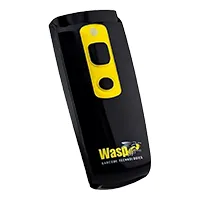 Wasp WWS250i
|
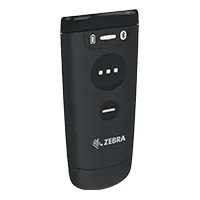 Zebra CS60
|
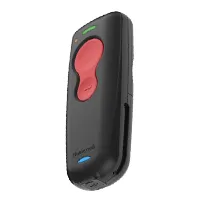 Honeywell Voyager 1602G
| |
|---|---|---|---|
| Scan Type | 1D & 2D Imager | 1D & 2D Imager | 1D & 2D Imager |
| Read Range | 20 in (51 cm) | 24 in (60 cm) | 36 in (91 cm) |
| Min Resolution | 4 mil | 4 mil | 3 mil |
| Battery (scans) | Up to 7,600 | Up to 16,000 | Up to 45,000 |
| Weight | 1.6 oz (45 g) | 1.7 oz (48 g) | 2.6 oz (74 g) |
| Wired Mode | No | Yes | Via cradle only |
| Internal Storage | 20,000 barcodes | -- | -- |
| Mobile Compatibility | iOS, Android, Windows | iOS, Android, Windows | -iOS, Android, Windows |
| Warranty | 1-year | 2-year | 3-year |
| Software Integration | Wasp Asset / Wasp Inventory | Zebra 123Scan / Mobility DNA | Honeywell EZConfig |
| Single-Vendor HW+SW | Yes | No | No |
The Honeywell Voyager 1602G’s 45,000-scan battery is exceptional. It effectively runs for days between charges under typical usage. The CS60’s 16,000 and WWS250i’s 7,600 are adequate for full-shift use under most workloads. For teams doing high-volume field scanning without reliable charging access, the Voyager 1602G’s battery is a decisive advantage.
The WWS250i and CS60 are both under two ounces which is genuinely forgettable in a pocket. The Voyager 1602G’s larger battery makes it 63% heavier than the WWS250i. Still compact by absolute standards, but noticeably heavier for all-day belt or pocket carry.
The Wasp WWS250i pairs with Wasp Asset and Wasp Inventory running on a paired mobile device. Field staff can conduct asset audits, cycle counts, or receiving checks on a phone or tablet. No laptop required. The internal memory buffer stores up to 20,000 barcodes when Bluetooth range is briefly interrupted, syncing on reconnect.
Not sure which scanner is right for you? Talk to a hardware specialist »
Wasp WWS250i
Best for: Mobile asset and inventory workers in the Wasp ecosystem
Lightest option, native Wasp software connection, internal storage buffer. For teams using Wasp software who need mobile scanning without a dedicated mobile computer.
Zebra CS60
Best for: Users who alternate between desk and mobile use
The only scanner in this comparison that converts between wired and wireless modes. For retail associates or back-office staff who split their day between a counter and the floor, one device handles both.
Honeywell Voyager 1602G
Best for: Field teams prioritizing scan range and all-day battery
The natural add-on for organizations already managing Zebra hardware. 3-year warranty and 123Scan configuration support for IT-managed deployments.
Honeywell Voyager 1250g
Best for: High-volume receiving, healthcare, and damaged-barcode environments
36-inch range, 45,000-scan battery, 3-mil resolution, 3-year warranty. The best raw-performance pocket scanner here. For field workers doing extended mobile shifts without charging access, the Voyager 1602G’s capabilities are difficult to match at this form factor.
The Honeywell Voyager 1602G leads on scan range and battery. It’s the best pure-performance pocket scanner here. The CS60 wins on wired/wireless flexibility. The WWS250i wins on weight and software integration. It’s the right call for mobile teams already running Wasp software.
Interested in the WWS250i? Request a Quote »
Pocket scanners pair via Bluetooth like a wireless keyboard. Once paired, the scanner sends barcode data as keyboard input to whatever app is active on the device whether that’s your inventory app, asset tracker, or any text-input field. Setup takes under a minute and requires no special driver.
The Wasp WWS250i stores up to 20,000 barcodes in internal 2MB memory when Bluetooth connectivity is interrupted. Data syncs to the connected device when the connection is restored which is useful for environments where workers periodically move out of range.
Yes. The WWS250i pairs with iOS and Android devices running the Wasp mobile apps. Run Wasp Asset or Wasp Inventory on a tablet or phone, pair the WWS250i, and scan. Records update in real time. Full mobile tracking without a dedicated mobile computer.
For occasional scanning, a phone camera with a scanning app is adequate. For teams doing dozens or hundreds of scans per shift, a dedicated pocket scanner is significantly faster and more reliable. It reads damaged, poorly lit, and low-contrast barcodes that phone cameras frequently miss, without autofocus delay.
The WWS250i includes a 1-year standard warranty. WaspProtect extended service plans add accidental breakage coverage and 48-hour repair turnaround. Wasp also provides standard technical support.
The CS60 can connect via USB cable in addition to wireless Bluetooth which makes it function as a standard corded scanner when docked at a workstation. Teams that scan at a counter part of the day and on the floor the other part don’t need two scanners. The wired mode also keeps the device charged and eliminates battery concerns during desk use.
Specifications sourced from Wasp Barcode Technologies, Zebra Technologies, and Honeywell product documentation. All product names are trademarks of their respective owners. waspbarcode.com | 1-866-547-9277