




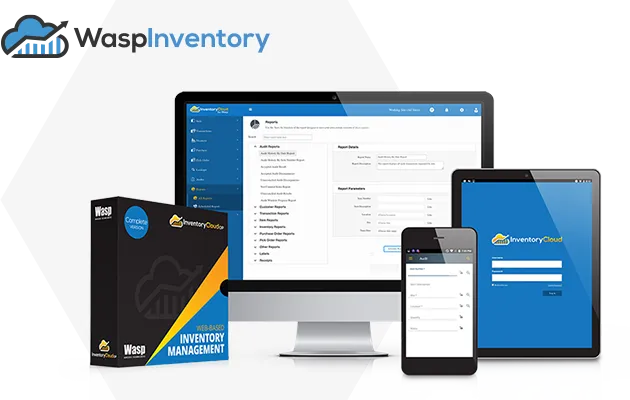

Inventory Management Software That Works For You.
With robust features like best-in-class inventory scanning, alerts, fully customizable reporting, offline inventory and our companion mobile app, Wasp Inventory can help maximize profitability and improve efficiency so you can spend more time growing your business
Streamline Inventory Management
Streamline Inventory Audits and Cycle Counts
Maintain accurate stock counts, reduce errors, and avoid time-consuming manual entry of items, location bins, pick orders, and inventory receiving – all in one inventory control system. Real-time tracking of inventory level reports allow you to compile and analyze essential data, including transactions by site or warehouse, itemized inventory levels by SKU, or individual customer purchase order history. Wasp empowers business owners and warehouse managers with the types of inventory control software they need so they can keep customers happy from a wide variety of complex supply chains.
Automatic low stock level notifications ensure you keep up with customer demand and never lose out on another sale due to stockouts. Set automatic reorder points down to each bin location as well as preferred vendors for each inventoried item. Exercise true stock control over inventory levels to build your cash flow, all within the Wasp inventory management software.
Easy-to-Implement
Maintain accurate stock counts, reduce errors, and avoid time-consuming manual entry of items, location bins, pick orders, and inventory receiving – all in one. Built with knowledge collected from thousands of Wasp inventory client use cases, our physical inventory control systems come out-of-the-box ready with the advanced features and real-time visibility to improve the way you do business.
Easy Implementation | Intuitive Interface | Robust Features | Minimal Learning Curve
Wasp Inventory Management Software Features
Streamline Ordering Process
Wasp Inventory provides a critical, centralized process to control the management of ordering, receiving, and picking of both inventory and non-inventory items. One unified, cloud-based solution to manage your orders from all departments and channels, with instant status updates on both purchase and pick/sales orders
Purchase with a Purpose
Purchase order requisitions for inventory items are made simple by manual or automatically generated trigger alerts. Inventory and non-inventory purchased items and services can be consolidated on a single purchase order from your entire inventory. Buyers can make informed decisions on purchase order quantities and due dates supported by price and delivery history for approved vendors.
Quick, Accurate, Validated
Prepare pick order requisitions for inventory items to ensure the correct product, order, and customer every time. With accurate records in an asset management system, inventory and non-inventory purchased items and services can be consolidated on a single pick order and provided to inventory pickers to ensure order accuracy. Wasp Inventory puts a more efficient picking process with mobile barcode scanning to identify picking errors at the source, thus eliminating the time period finding and correcting errors when back at a packing station.
Streamline Ordering Process
Wasp Inventory provides a critical, centralized process to control the management of ordering, receiving, and picking of both inventory and non-inventory items. One unified, cloud-based solution to manage your orders from all departments and channels, with instant status updates on both purchase and pick/sales orders
Drop Ship On Demand
Picking an order and realize you don't have enough inventory of finished products on hand to fulfill it? We've solved this problem with Wasp Inventory by enabling you to convert the pick order to a purchase order instantly, while enjoying the ease of shipping directly from your vendor to your customer. There's no need to adjust your safety stock levels, receiving items in, or adjust the current pick order.
Move Beyond Periodic Inventory
Expand your supply chain management with a perpetual inventory control process designed to track your products at every step with inventory records that will alert you to excess inventory or warn you of potentially dead stock. Inventory optimization starts with the right inventory software, empowering your entire process with a competitive edge in the warehouse.
Examples of Use
Warehouse Management
Whether you're picking, packing, or shipping, Wasp Inventory helps you better manage warehouse inventory...
Manufacturing Process Management
The inventory costs incurred from just a single inefficient manufacturing process can be staggering, which is why manufacturers turn to Wasp...
Consumables Tracking
Whether you're a construction company or a hospital, there's a constant demand for critical supplies and we help you track...
Stock Room Management
It can be a constant struggle to maintain essential supplies for just a single business division, but Wasp Inventory makes it easy...
Retail Inventory
Stocking issues are retail's kryptonite because you can't sell a product you don't have. We have a solution to those costly stockouts...
Lot & Date Code Tracking
As a manufacturer, you just can't get around this. We help you manage and maintain physical counts for superior tracking...
Wasp Inventory Reviews
Pratik T
Product: Wasp InventoryCloud
Excellent inventory management system. Our overall experience with InventoryCloud is delightful.
Capterra
Mike K
Product: Wasp InventoryCloud
I don't know how we ever did our jobs before we had InventoryCloud. I do know that we are now much more effective and efficient. It's a game changer.
Capterra
Magda V
Product: Wasp InventoryCloud
Love using InventoryCloud. Makes life and work so much better. It is user friendly. Easy to understand and navigate.
Capterra
Organizations Trust Wasp for Tracking Solutions
Common questions about inventory management software
What is inventory management software?
Inventory management software tracks the stock your business buys, stores, uses, or sells. It keeps SKUs, quantities, locations, vendors, and reorder points in one place instead of across spreadsheets and manual counts. Each scan, receipt, pick, or transfer updates inventory levels in real time. Wasp Inventory manages the full inventory process, from receiving and storage to picking, transfers, cycle counts, audits, and reordering.
What's the difference between Wasp Inventory, InventoryCloud, and InventoryControl?
Wasp Inventory and InventoryCloud are the same inventory management software. InventoryCloud was the original product name. Wasp Inventory is the current name. Today, Wasp Inventory is available in two deployment options: Wasp Inventory – Cloud and Wasp Inventory – On-Premise (OP), allowing businesses to choose the setup that best fits their requirements. InventoryControl was Wasp’s previous inventory management software. It is now considered a legacy product and has been replaced by Wasp Inventory. Existing customers may still recognize the InventoryControl name, but Wasp Inventory is Wasp’s current inventory management software.
What can I track with inventory management software?
Inventory management software tracks the products, parts, and supplies your business buys, stores, uses, or sells. Wasp customers use it to track warehouse inventory, finished goods, raw materials and manufacturing components, retail stock, medical supplies, maintenance parts, tools, lab consumables, and rental inventory across one or multiple locations. If an item has a quantity that changes over time, Wasp Inventory helps you keep accurate inventory records, know what’s in stock, and reduce manual tracking with barcode scanning and real-time inventory visibility.
How does inventory management software help with stock counts and audits?
Stock counts without software mean shutting down operations, walking the warehouse with a clipboard, and reconciling counts against spreadsheet records by hand. With Wasp Inventory, counts are handled with barcode scanning. Teams can walk a warehouse or stockroom, scan inventory, and update counts in real time. The software flags discrepancies immediately instead of days or weeks later. The same process applies to cycle counts, spot checks, and full inventory audits. For businesses managing monthly counts, quarterly audits, or annual physical inventory, that means less manual work, faster reconciliation, and more accurate inventory records.
Does inventory management software support multiple warehouse locations?
Yes. The Complete and Enterprise versions of Wasp Inventory support tracking inventory across multiple warehouses, stores, stockrooms, and inventory locations. Inventory is tracked by site, warehouse, location bin, and SKU, so a business can see inventory levels across all locations from one system. Each scan or transaction updates the correct location automatically, and transfers between sites update both inventory locations in one step. For multi-site operations, this eliminates the need to manage separate spreadsheets or manually reconcile inventory across locations.
How does inventory management software handle reorder points and low-stock alerts?
Wasp Inventory automatically monitors inventory levels as quantities change. You can set automatic reorder points down to the individual bin location level, helping teams maintain better control over inventory across warehouses and stockrooms. When inventory drops below a defined threshold, the software can send automatic low-stock notifications to designated team members so they can reorder inventory before stock runs out. Wasp Inventory also supports preferred vendors for inventoried items and customizable notifications for specific inventory events, helping reduce manual follow-up and keeping inventory moving more efficiently.
Can inventory management software handle lot and date code tracking?
Yes, Wasp Inventory supports advanced item tracking by lot number, expiration date, and serial number. Lot and date code tracking helps businesses trace specific batches of inventory, monitor expiration dates, and maintain more accurate inventory records across receiving, storage, and fulfillment. This is especially important for businesses managing regulated or time-sensitive inventory such as medical supplies, pharmaceuticals, food, beverage, or manufacturing components. Wasp Inventory helps businesses maintain physical counts and improve inventory traceability without relying on manual spreadsheets or paper records.
Should I choose cloud or on-premise inventory management software?
Wasp Inventory is available in cloud (Wasp Inventory – Cloud) or on-premise (Wasp Inventory – On-Premise) deployments. Cloud is the default for most customers: easier setup, automatic updates, mobile access from any internet-connected device, and U.S. data residency. On-premise is the right call for IT teams running behind their own firewall, organizations with strict network segmentation or air-gapped environments, and sectors with compliance mandates that rule out SaaS, including government, defense, healthcare under specific regulations, and some manufacturing environments. Wasp offers both with a documented migration path between them, so the choice today doesn’t lock you out of changing later.
How long does it take to set up inventory management software?
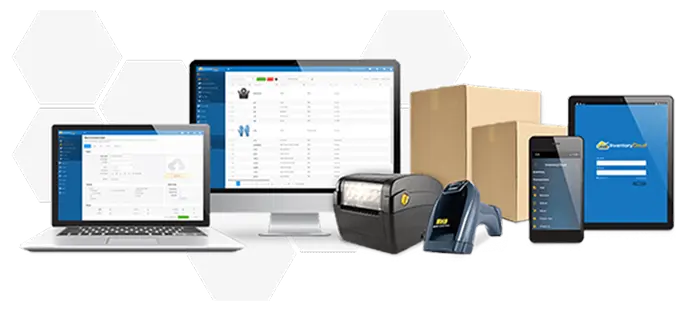
Setup time depends on how much inventory data needs to be imported, how organized your existing records are, and how many locations or warehouses you’re managing. Many businesses can begin tracking inventory within a week, especially when starting with a single warehouse or stockroom and a straightforward inventory process. More complex setups involving multiple locations, larger inventory databases, or integrations with existing systems may take longer. Wasp provides software, barcode scanners, barcode printers, labels, and support together, which helps simplify setup and reduce compatibility issues between systems and hardware.
How does inventory management software compare to managing inventory in a spreadsheet?
Spreadsheets can work for smaller inventory operations with limited inventory movement. But as inventory grows, manual updates become harder to maintain accurately. Problems usually start when inventory counts go stale between manual updates, teams need visibility across multiple locations, or stockouts happen because inventory levels are being tracked manually. Physical counts and audits also take longer when inventory records exist across multiple spreadsheets. Inventory management software keeps inventory counts updated in real time as items are received, picked, transferred, or used. With barcode scanning, multi-location visibility, reorder alerts, and audit history in one system, businesses can manage inventory more accurately and spend less time reconciling spreadsheets.
Let Us Show You How It Works
Request your Wasp inventory management software consultation today